Eachine QX-95 Unable to Bind to Flysky FS 16x

Barry

Member
Joined
Mar 5, 2026
Messages
11
Reaction score
4
Age
59
Location
Finland
Hi everyone, I am very new to drones and need a lot of help please.

I bought a second hand Eachine QX-95 Mini Drone, the drone came with Flysky protocol.
It has an f3 evo brushed flight controller, the firmware is betaflight_4.0.6_SPRACINGF3EVO.
I have been trying to bind the drone to the Flysky FS 16x, the Flysky 16x has 10 channels, the RF standard is set to AFHDS 2A and the RX output is PPM/i-BUS. The firmware for the Flysky 16x is 1.0 26 June Hard Ver: 1.0.
When I plug the drone into my laptop or when I plug the battery in 3 lights are seen on the FC, a solid red light, a slow fashing green light and a slow flashing blue light. The FC has 2 binding pads that need to be shorted out to put the drone into binding mode. When I short the binding pads out, the slow flashing green light starts to blink much faster. To bind the transmitter to the drone, I put the drone into binding mode by shorting out the binding pads, plugging in the battery and once the green light is flashing fast I hold down the black binding button on the transmitter and then turn the transmitter on. The transmitter says RX Binding but it does not bind with the drone.

Any help would be greatly appreciated.

Barry
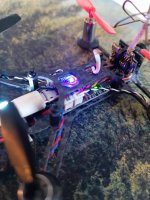


Eachine QX95.jpeg
 
I'm not expert of Flysky systems, but....try to look here:
"eachine qx95 binding" https://share.google/ql80Eb9vp7bL4TwTr
Hello DoubleG

Thank you for your reply, its much appreciated. I have gone through this video a few times, I have gone through many other videos too, none of them seem to help.

The video you directed me to suggests I should turn off AFHDS 2A, I do not have the option to turn this off, I have the option to change AFHDS 2A to AFHDS, but thats it.
 
I found this method on Reddit...try.

Turn off AFHDS. Do not solder the pads on the quad. Connect the battery. Turn on the transmitter while binding (don't worry if it doesn't bind properly). Turn off the tx, unplug the quad. Connect the battery back to the quad, connect to Betaflight or whatever software you use. Go to the receiver board, turn on the transmitter and move the levers on the tx, see if the bars move in the software. Unplug, arm the quad engines and fly
 
And again:

Make sure your radio channels arec calibrated to 1000min 1500mid 2000max
 
Turn off AFHDS.
How do I turn off AFHDS or AFHDS 2A. I do not see an option for this on Flysky FS-16x?

Do not solder the pads on the quad.
I use a screwdriver to short the binding pads, i can not solder.

Turn off the tx
What's a TX, sorry I am very new to this.

Connect the battery back to the quad, connect to Betaflight
Can I connect the battery and the data lead to connect to my laptop at the same time? I have been using realflight not betaflight. When I try to use betaflight it takes me to a CLI page and wants me to update the firmware, as far as I know i am already on the latest firmware for this drone.
 
How do I turn off AFHDS or AFHDS 2A. I do not see an option for this on Flysky FS-16x?
It's possible only on fs16, non fs16x


I use a screwdriver to short the binding pads, i can not solder.
Ok


What's a TX, sorry I am very new to this.
TX is the transmitter


Can I connect the battery and the data lead to connect to my laptop at the same time?
I think yes, not sure 100%, but if not how can you read data from the drone?


I have been using realflight not betaflight. When I try to use betaflight it takes me to a CLI page and wants me to update the firmware, as far as I know i am already on the latest firmware for this drone.
Here I cannot help you, but I will try.
 
Find this info's
Configuring with F3 Flight Controller (If Applicable)
If connecting to an F3 board:
Connect the receiver to the flight controller (using iBus/SBUS/PPM).
In Betaflight, under the Ports tab, enable Serial RX on the UART port you connected to.
Under the Configuration tab, select Serial-based receiver and IBUS (for Flys ky).


Alternative binding method:
Turn on the transmitter while holding the bind key, then power the drone, wait ~30 seconds, turn off the transmitter, and then back on.
 
but if not how can you read data from the drone?
Cleanflight reads the drone information without the battery, the data lead powers the drone. I did as you suggested, none of the columns moved when I use the transmitter.
 
  • Sad
Reactions: DoubleG
Connect the receiver to the flight controller (using iBus/SBUS/PPM).
The transmitter is set to PPM and i-Bus

In Betaflight, under the Ports tab, enable Serial RX on the UART port you connected to
I have no idea which UART I am connected to, how do I know this?

Under the Configuration tab, select Serial-based receiver and IBUS (for Flys ky).
This is already set in cleanflight.
 
I'm sorry I can't help you more, as I told you I'm not an expert in these protocols, and I don't know the Flysky
 
Last edited:
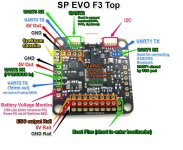
You need the F3 pinout diagram...something like this
View attachment 885

Doesn't communicate with fc board or is not bound
This is not the board i have and i can not find the board i have anywhere.
Its getting late here, I will give up tonight and start again tomorrow.
Thank you so much for all your help, have a good day/night wherever you are.
Good night
 
  • Like
Reactions: DoubleG

Recent Posts

Members online

No members online now.

Forum statistics

Threads
1,853
Messages
6,217
Members
2,367
Latest member
Barry