
Hi everyone, I am very new to drones and need a lot of help please.
I bought a second hand Eachine QX-95 Mini Drone, the drone came with Flysky protocol.
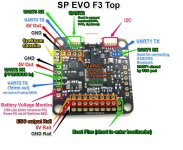
It has an f3 evo brushed flight controller, the firmware is betaflight_4.0.6_SPRACINGF3EVO.
I have been trying to bind the drone to the Flysky FS 16x, the Flysky 16x has 10 channels, the RF standard is set to AFHDS 2A and the RX output is PPM/i-BUS. The firmware for the Flysky 16x is 1.0 26 June Hard Ver: 1.0.
When I plug the drone into my laptop or when I plug the battery in 3 lights are seen on the FC, a solid red light, a slow fashing green light and a slow flashing blue light. The FC has 2 binding pads that need to be shorted out to put the drone into binding mode. When I short the binding pads out, the slow flashing green light starts to blink much faster. To bind the transmitter to the drone, I put the drone into binding mode by shorting out the binding pads, plugging in the battery and once the green light is flashing fast I hold down the black binding button on the transmitter and then turn the transmitter on. The transmitter says RX Binding but it does not bind with the drone.
Any help would be greatly appreciated.
Barry
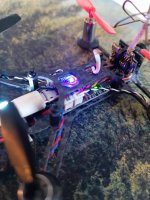
I bought a second hand Eachine QX-95 Mini Drone, the drone came with Flysky protocol.
It has an f3 evo brushed flight controller, the firmware is betaflight_4.0.6_SPRACINGF3EVO.
I have been trying to bind the drone to the Flysky FS 16x, the Flysky 16x has 10 channels, the RF standard is set to AFHDS 2A and the RX output is PPM/i-BUS. The firmware for the Flysky 16x is 1.0 26 June Hard Ver: 1.0.
When I plug the drone into my laptop or when I plug the battery in 3 lights are seen on the FC, a solid red light, a slow fashing green light and a slow flashing blue light. The FC has 2 binding pads that need to be shorted out to put the drone into binding mode. When I short the binding pads out, the slow flashing green light starts to blink much faster. To bind the transmitter to the drone, I put the drone into binding mode by shorting out the binding pads, plugging in the battery and once the green light is flashing fast I hold down the black binding button on the transmitter and then turn the transmitter on. The transmitter says RX Binding but it does not bind with the drone.
Any help would be greatly appreciated.
Barry